What "Local Processing" Actually Means for Your Social Media Privacy
Want to see who isn't following you back right now?
Use our safe Instagram unfollower checker — no login needed. Upload your official Instagram data export and get instant results.
When you hear the phrase "privacy-first," you probably think about strong passwords and two-factor authentication. You protect your login credentials, assume your account is safe, and go about your day.
But for creators and everyday users in 2026, a secure password is no longer enough. The new frontier of social media privacy isn't just about who can access your account—it is about where your data is going once you hand it over.
If you are using a traditional unfollower app, you are likely falling victim to server-side processing. It’s time to understand the critical difference between handing your data over to a stranger and utilizing Local Processing.
The Hidden Cost of Server-Side Apps
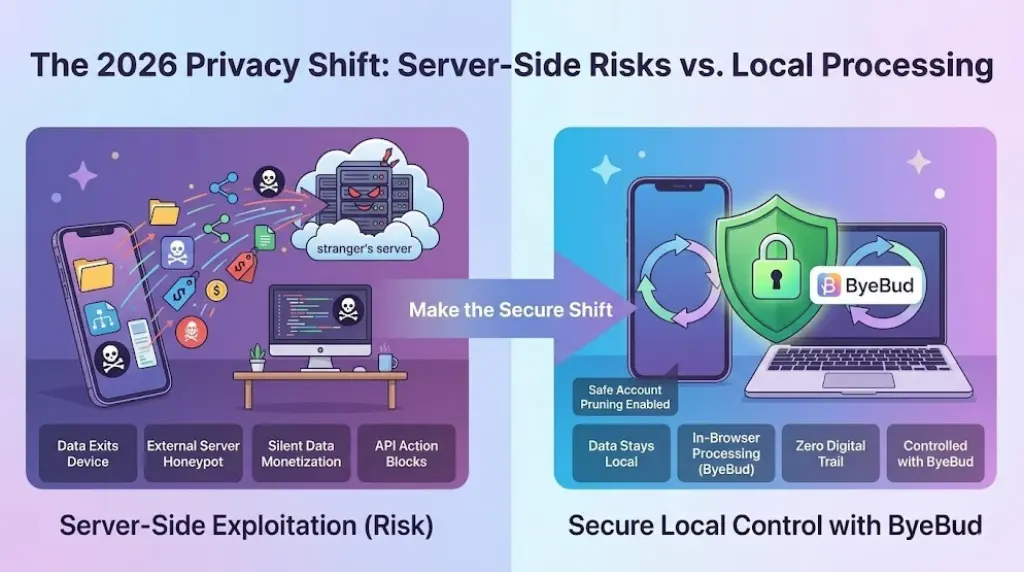
Most third-party Instagram tools operate on external servers. Whether they ask for your login or ask you to upload a file, the fundamental mechanism is the same: your personal data leaves your device and travels to a computer owned by someone else.
Why is this dangerous?
-
The "Honeypot" Effect: Servers storing thousands of users' follower lists, behavior patterns, and session tokens are prime targets for hackers.
-
Silent Monetization: Many "free" apps aren't actually free. They pay for their expensive server costs by aggregating your data—mapping out your "Interest Graph" and selling your demographic information to third-party advertisers.
-
API Flags: When an external server repeatedly pings Instagram's servers to check your follower count, Meta's security AI flags it as bot activity, leading to shadowbans or immediate Action Blocks.
When your data is processed on a server, you surrender control the second you click "submit."
What "Local Processing" Actually Means
Local processing is the exact opposite of the server-side model. Instead of sending your data away to be analyzed, the analysis happens entirely within your own web browser.
When you use a local-first tool, your phone or computer does all the heavy lifting. The app simply provides the code to read the data, but the data itself never actually leaves your screen. It is a "zero-knowledge" architecture—meaning the developers of the tool literally cannot see, store, or sell your information because it never touches their servers.
Why Your Browser is Your Best Defense in 2026
With Meta cracking down aggressively on third-party access, taking a local-first approach is more about protecting your account's algorithmic health.
Here is what happens when you switch to local processing:
-
Zero Digital Trail: Because nothing is uploaded to the cloud, there is no database for hackers to breach.
-
No Action Blocks: Instagram cannot penalize you for using unauthorized API bots, because you aren't using an API at all. You are simply reading a file that Meta already gave you.
-
Instant Results: Server-side apps often make you wait in "queues" while their computers process requests. Local processing leverages your own device's memory, giving you your unfollower list instantly.
How to Audit Your Account the Safe Way
If you want to clean up your following list without risking your reach or your data, you need to follow the zero-knowledge playbook.
Step 1: Request the Official Export
Never type your password into a third-party field. Go directly into your Instagram settings and request your official Data Download in JSON or HTML format.
Step 2: Keep It on Your Device
Once you receive the zip file from Meta, download it directly to your phone or desktop. Do not upload this file to any cloud-based analyzer.
Step 3: Analyze Locally
Open a browser-based, local-processing tool like ByeBud. When you drop your file into the system, your browser immediately cross-references your "followers" and "following" lists locally.
Step 4: Prune Manually
Take the generated list of non-followers and manually unfollow them inside the official Instagram app. Stick to safe daily limits to keep your account health pristine.
Stop Paying With Your Privacy
In 2026, you shouldn't have to choose between keeping a clean, highly engaged Instagram feed and protecting your digital footprint.
True privacy means owning your data from start to finish. If an app needs to upload your personal connections to their own servers just to tell you who unfollowed you, it’s time to close the tab. Protect your reach, protect your data, and keep your processing local.
Want to see who isn't following you back right now?
Use our safe Instagram unfollower checker — no login needed. Upload your official Instagram data export and get instant results.
Related articles
- Auditing Nonprofit Instagram Accounts: Beyond Vanity Follower CountsFor charities and community organisations, social media success is measured in real-world action, not follower tallies. Here is how to run an effective, privacy-first audit.
- What Happens When an Instagram Follower Deactivates or Deletes Their AccountWhen a follower disappears, they may not have unfollowed you. Discover how Instagram handles deactivated and deleted accounts, from missing DMs to cached counters.
- How to Remove Third-Party Apps Connected to Your InstagramA complete, step-by-step cleanup guide on how to audit, revoke, and remove third-party apps connected to your Instagram account on mobile and desktop.
- What Happens to Instagram Reach in the First 14 Days After a Follower PurgeDoes removing followers affect reach immediately? Here is a breakdown of what happens to your Instagram impressions, engagement percentages, and algorithmic distribution during the first 14 days after an audience clean-up.
- Why Your Instagram Export Count Is Missing Deactivated AccountsWhen your official Instagram export lists fewer followers than the number displayed on your profile, deactivated accounts and pending requests are usually responsible. Here is how Meta treats dormant records in data downloads.