What to Do With Your Instagram Unfollower List: An Action Framework
Want to see who isn't following you back right now?
Use our safe Instagram unfollower checker — no login needed. Upload your official Instagram data export and get instant results.
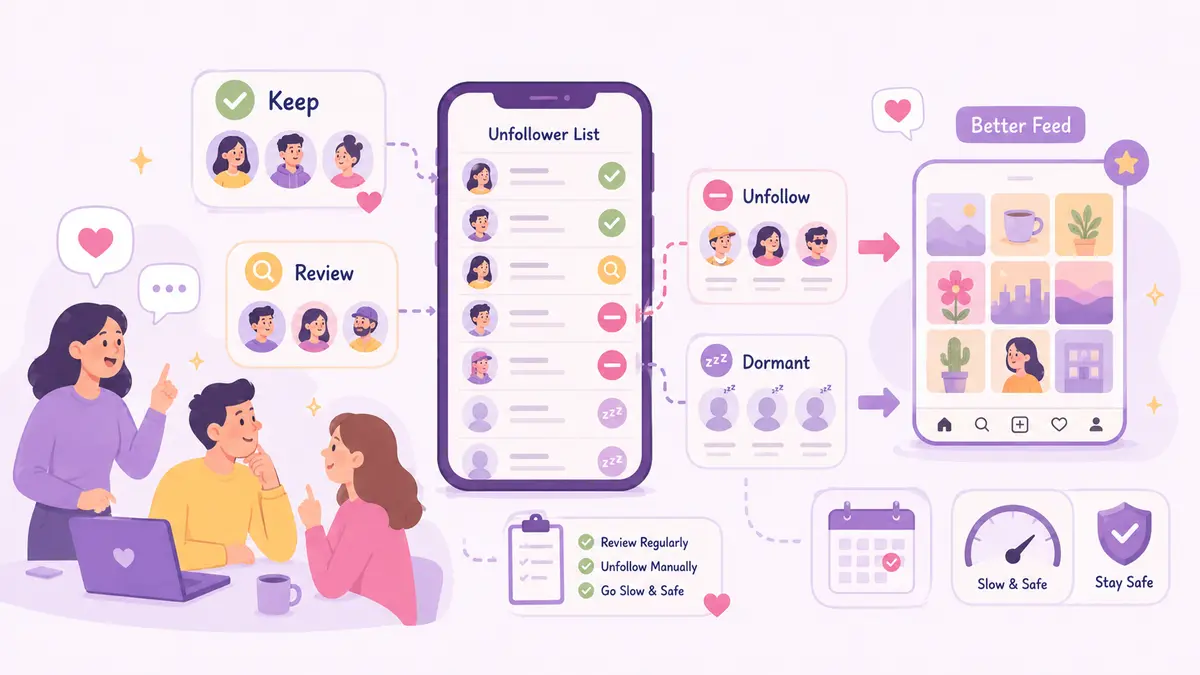
So you've got your export (ByeBud processes it right in your browser, no login needed) and you've got a list of accounts that don't follow you back. Now what? Mass-unfollowing everyone at once is a bad idea — it risks platform restrictions and cuts relationships you might actually want to keep. Here's a simple way to work through the list without making a mess of it.
1. Sort before you touch anything
Not every non-follower deserves the same treatment. Split your list into four rough buckets:
- Reference accounts — journalists, experts, creators you genuinely learn from, regardless of whether they follow back
- Real people — friends, former colleagues, acquaintances who just don't post much or follow many people
- Follow-for-follow accounts — followed you to get a follow-back, then quietly unfollowed once you did
- Dead accounts — no activity in 6-12 months, clearly abandoned
Doing this first keeps you from making snap decisions account by account.
2. Set simple rules for each bucket
- Reference accounts: keep them. Reciprocity doesn't matter if you're actually reading what they post.
- Real people: think about the offline relationship. If unfollowing would cause any awkwardness in real life, it's usually not worth it for a marginal metrics gain.
- Follow-for-follow accounts: remove. They rarely engage and just clutter your feed.
- Dead accounts: remove. There's no real downside here.
3. Remove accounts slowly, not all at once
This is the part people get wrong. Instagram flags rapid bursts of the same action as spammy behavior, and that can get you temporarily restricted.
- Cap it at 20-30 unfollows a day, split across a couple of sessions
- Don't click through at machine speed — pause between accounts like a normal person would
- Do it manually in the app. Skip anything that asks for your login to automate the process — that's a much bigger risk than the cleanup itself
Spread over a week or two, you'll comfortably hit your target without tripping anything.
4. Give your feed time to recalibrate
Every account you follow is a signal to Instagram about what you want to see. After a cleanup:
- Glance through who's left and make sure it still reflects what you actually care about
- Actually engage — like, comment, save — with the accounts you kept, so the algorithm reinforces them
- Watch your Explore tab over the next week; it should start drifting back toward your real interests as the noise clears out
5. Avoid ending up back here in six months
The list gets bloated in the first place from loose following habits, so tighten those up going forward:
- Stop auto-following back — check someone's content first
- Be suspicious of big accounts that suddenly follow you out of nowhere; a huge following-to-follower ratio is often a churn tactic, not genuine interest
- Redo this export review every few months instead of letting it pile up into a big one-time overhaul
Segment, apply consistent rules, pace the removals, let your feed adjust, then keep the habits tight going forward — that's really the whole process.
Want to see who isn't following you back right now?
Use our safe Instagram unfollower checker — no login needed. Upload your official Instagram data export and get instant results.
Related articles
- Why Local Browser Processing Beats Any Privacy BadgeA privacy badge is only a legal promise, but local browser processing creates an unbreakable technical boundary. Here is why client-side execution matters.
- 5 Content Changes to Test After Your Instagram AuditA profile audit shows where you lose audience attention. Here is a five-step testing plan to refine hooks, carousels, and stories for better retention.
- The Math Behind Rising Engagement Rates as Followers DropLosing followers can actually improve your performance metrics. Here is the mathematical formula behind rising engagement rates and why a smaller audience often boosts distribution.
- What to Do If You Gave Your Password to an Instagram AppIf you gave your password to an unfollower tracker or third-party app, act fast. Here are the exact damage-control steps to secure your Instagram account right now.
- How to Calculate Real Instagram Engagement From Your Data ExportLearn how to calculate your real Instagram engagement rate directly from your raw data export files using a precise formula and weighted interaction metrics.