The Viral Curse: When the Wrong Audience Breaks Your Niche
Want to see who isn't following you back right now?
Use our safe Instagram unfollower checker — no login needed. Upload your official Instagram data export and get instant results.
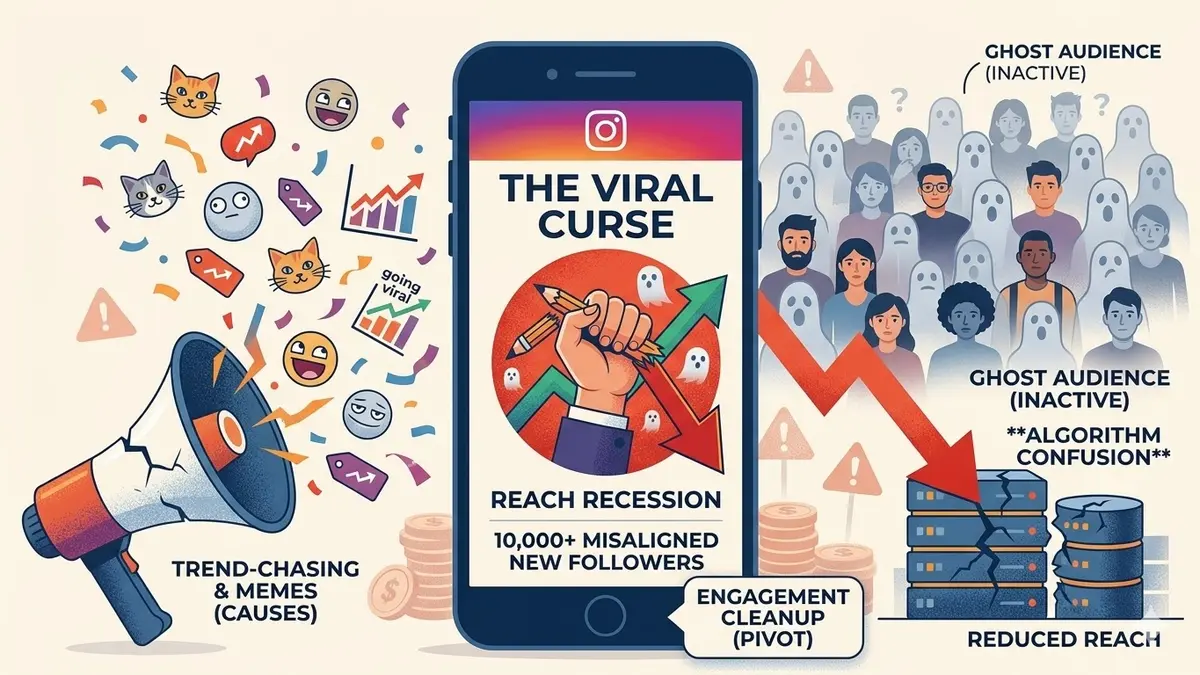
Going viral sounds like the ultimate achievement on Instagram. You wake up to thousands of notifications, your follower count is skyrocketing, and your reach is at an all-time high.
But for many creators in 2026, a viral moment is actually the beginning of a "reach recession."
If your Reel about a funny cat goes viral on your professional business account, you haven’t just gained 10,000 followers—you’ve invited 10,000 people who likely have zero interest in your actual niche. This is often referred to as the Viral Curse.
Why Misaligned Virality Is Dangerous
The algorithm rewards consistency and relevance. When you go viral for something outside your niche, you attract a "general interest" audience.
Common sources of the Viral Curse include:
- Using trending audio that has nothing to do with your industry.
- Posting "low-effort" memes just to get views.
- Sharing personal life updates that appeal to a mass audience but not your target client.
While your numbers look impressive for a few days, these new followers are often "silent" the moment you go back to your regular content.
How the "Wrong" Audience Destroys Reach
Instagram’s ranking system relies heavily on the initial reaction of your followers. Here is what happens after a misaligned viral spike:
The Engagement Gap
If you have 10,000 new followers who joined for a cat video, they will likely scroll past your next post about industry insights. To the algorithm, this looks like your core audience is bored with your content.
Diluted Audience Density
As we’ve discussed before, active audience density is the key metric in 2026. When your follower count is high but your engagement stays the same (or drops), your engagement rate per follower plummets.
Algorithm Misidentification
The AI uses your followers' interests to decide who else might like your page. If your new followers are all "cat lovers" instead of "tech enthusiasts," Instagram will start showing your business posts to more cat lovers—who will also ignore them.
How to Pivot Back to Your Niche
If you’ve recently experienced a viral spike that feels "off," you need to take active steps to protect your account's health.
Step 1: Resistance to "Trend-Chasing"
It’s tempting to post another cat video to keep the numbers up. Don't. This only digs the hole deeper. Immediately return to high-quality, niche-specific content.
Step 2: Audit the New Influx
Monitor how many of these new followers are actually engaging. If you see a massive spike followed by a complete silence on your next three niche posts, you know you have a "ghost follower" problem in the making.
Step 3: Track the Fallout
Use a tool like ByeBud to analyze your account after the viral wave settles. Tracking helps you understand the true "cost" of that viral moment.
Step 4: Engagement Cleanup
If the reach doesn't recover within a month, you may need to manually remove followers who are clearly inactive or outside your target demographic to "reset" your engagement signals.
Building for the Right 1,000, Not the Wrong 1,000,000
In 2026, the smartest creators are no longer chasing the "millions of views" dream unless those views come from the right people.
A smaller, hyper-focused audience is infinitely more valuable than a massive, silent one. If your reach is falling despite your growth, it’s time to stop looking at the numbers and start looking at the people behind them.
Want to see who isn't following you back right now?
Use our safe Instagram unfollower checker — no login needed. Upload your official Instagram data export and get instant results.
Related articles
- Auditing Nonprofit Instagram Accounts: Beyond Vanity Follower CountsFor charities and community organisations, social media success is measured in real-world action, not follower tallies. Here is how to run an effective, privacy-first audit.
- What Happens When an Instagram Follower Deactivates or Deletes Their AccountWhen a follower disappears, they may not have unfollowed you. Discover how Instagram handles deactivated and deleted accounts, from missing DMs to cached counters.
- How to Remove Third-Party Apps Connected to Your InstagramA complete, step-by-step cleanup guide on how to audit, revoke, and remove third-party apps connected to your Instagram account on mobile and desktop.
- What Happens to Instagram Reach in the First 14 Days After a Follower PurgeDoes removing followers affect reach immediately? Here is a breakdown of what happens to your Instagram impressions, engagement percentages, and algorithmic distribution during the first 14 days after an audience clean-up.
- Why Your Instagram Export Count Is Missing Deactivated AccountsWhen your official Instagram export lists fewer followers than the number displayed on your profile, deactivated accounts and pending requests are usually responsible. Here is how Meta treats dormant records in data downloads.