The "Soft Block": How (and Why) to Force People to Unfollow You
Want to see who isn't following you back right now?
Use our safe Instagram unfollower checker — no login needed. Upload your official Instagram data export and get instant results.
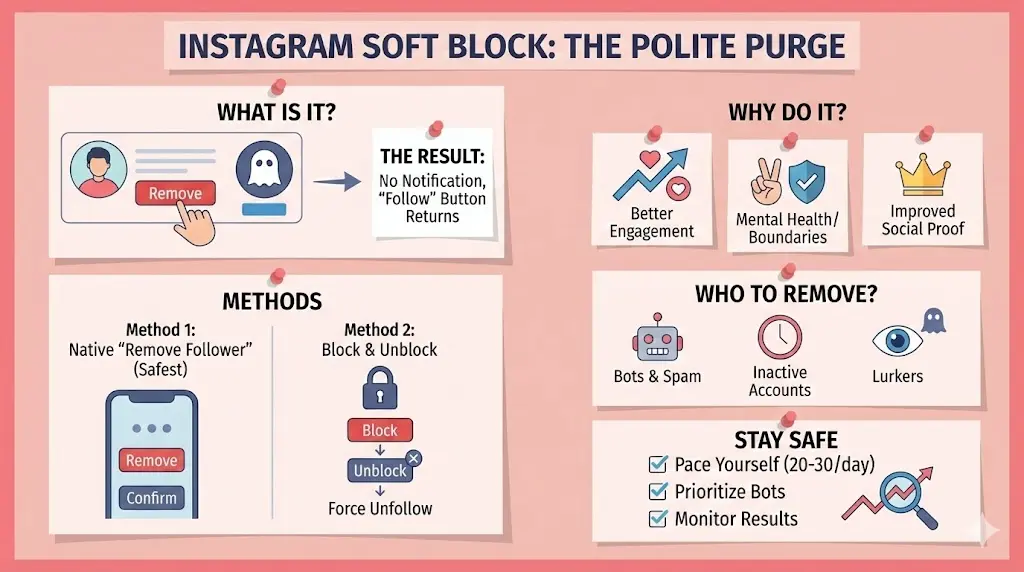
What Exactly is a "Soft Block"?
A soft block is the polite way to force someone to unfollow you without them ever getting a notification about it. Instagram calls this the "Remove Follower" feature.
When you remove a follower:
- They are no longer following you.
- They are not notified that you removed them.
- Your profile will simply show a "Follow" button to them again, making it look like a technical glitch or like they accidentally unfollowed you themselves.
Why You Need to Use the Soft Block in 2026
1. The "Ghost" Problem
Just like those bot accounts we talk about, some real people become "ghost followers." They follow you but never like, comment, or even view your content. This "dead weight" drags down your engagement rate—the holy grail of the Instagram algorithm. If your followers aren't engaging, Instagram assumes your content isn't worth showing to new people.
2. Social Boundary Setting
Sometimes it isn't about the algorithm; it's about your mental health. Whether it's an ex-partner, a nosy relative, or a "creepy" coworker, you deserve to post without feeling watched by people you don't actually want in your circle.
3. Improving "Social Proof"
As we’ve discussed before, your follower-to-following ratio matters. But so does the quality of your followers. Having a list full of random, inactive, or "weird" accounts makes your profile look less professional to potential brand partners who look at engagement metrics over raw numbers.
How to Soft Block Like a Pro
Method 1: The Native "Remove Follower" (Safest)
This is the official way to do it.
- Go to your profile and tap on your Followers list.
- Search for the specific person or bot.
- Tap the three dots (or the "Remove" button) next to their name.
- Confirm by tapping Remove.
Method 2: The Block and Unblock
This is the "old school" way. By blocking someone and then immediately unblocking them, you force a mutual unfollow. They won't be on your list, and you won't be on theirs. It's fast, but be careful not to do this too many times in one hour, or Instagram might flag you for "automated behavior".
Who Should Get the Boot?
Before you start a mass-clearing, look for these specific "Soft Block" candidates:
The "Lurkers": People who watch your stories but never interact—ever.
- Obvious Bots: Accounts with no profile picture or usernames full of random numbers.
- Inactive Accounts: People who haven't posted since 2022 and clearly aren't seeing your content.
- The "Lurkers": People who watch your stories but never interact—ever.
Keep Your Account Safe During the Purge
Just like when you are unfollowing others, you have to pace yourself.
- Go Slowly: Don't remove more than 20–30 followers per session.
- Prioritize: Start with the obvious bots first.
- Monitor Results: Over the next few weeks, keep an eye on your Story views and Reel reach. You should see those numbers start to climb as your "real" audience becomes a larger percentage of your total follower count.
Conclusion
You don't have to be a victim of your own follower list. Cleaning up who follows you is just as important for your reach as cleaning up who you follow. By using the "Soft Block" to remove ghost accounts and unwanted lurkers, you're telling the algorithm exactly who your content is for. Your engagement rate—and your sanity—will thank you.
Want to see who isn't following you back right now?
Use our safe Instagram unfollower checker — no login needed. Upload your official Instagram data export and get instant results.
Related articles
- Auditing Nonprofit Instagram Accounts: Beyond Vanity Follower CountsFor charities and community organisations, social media success is measured in real-world action, not follower tallies. Here is how to run an effective, privacy-first audit.
- What Happens When an Instagram Follower Deactivates or Deletes Their AccountWhen a follower disappears, they may not have unfollowed you. Discover how Instagram handles deactivated and deleted accounts, from missing DMs to cached counters.
- How to Remove Third-Party Apps Connected to Your InstagramA complete, step-by-step cleanup guide on how to audit, revoke, and remove third-party apps connected to your Instagram account on mobile and desktop.
- What Happens to Instagram Reach in the First 14 Days After a Follower PurgeDoes removing followers affect reach immediately? Here is a breakdown of what happens to your Instagram impressions, engagement percentages, and algorithmic distribution during the first 14 days after an audience clean-up.
- Why Your Instagram Export Count Is Missing Deactivated AccountsWhen your official Instagram export lists fewer followers than the number displayed on your profile, deactivated accounts and pending requests are usually responsible. Here is how Meta treats dormant records in data downloads.