The Secret Life of Your JSON File: 5 Things Meta Knows About Your Friendships (That You Don't)
Want to see who isn't following you back right now?
Use our safe Instagram unfollower checker — no login needed. Upload your official Instagram data export and get instant results.
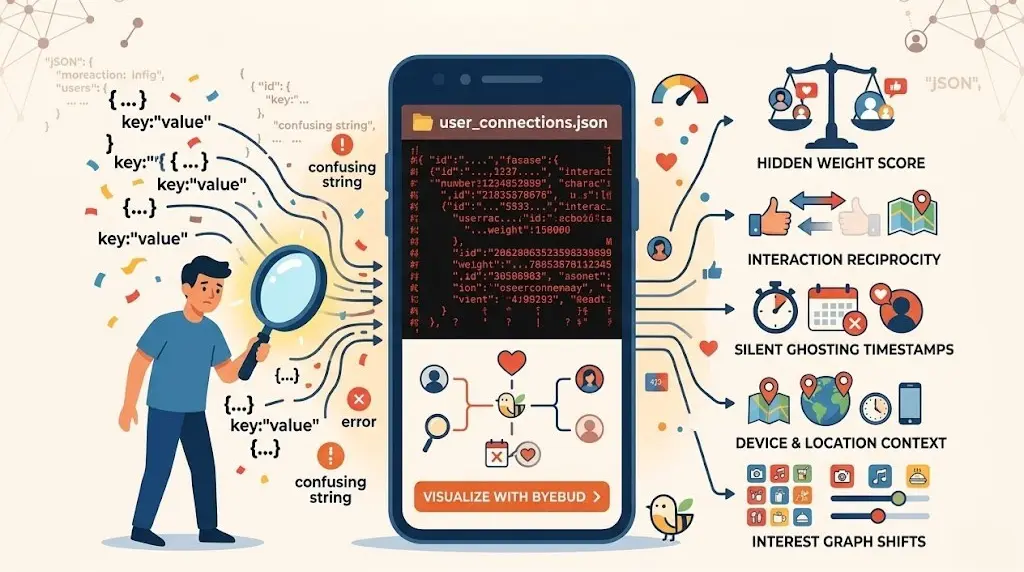
When you request your official data export from Instagram, you receive a folder full of files ending in .json. To most people, opening one of these looks like staring into the "Matrix"—thousands of lines of nested code, timestamps, and confusing strings of text.
Most users assume this is just a boring archive of their posts and a list of names. But in 2026, your JSON file is much more than a list; it is a mathematical map of your social status.
Behind every username in that file is a set of metadata that Meta uses to determine your "closeness" to every person you follow. Here are five things hidden in that code that explain exactly how the algorithm sees your friendships.
1. The Hidden "Weight" Score
Ever wonder why the same five people always appear first in your Story tray? It isn’t random. Within your data logs, Meta assigns a "weight" or affinity score to your interactions. Every time you tap a profile, linger on a photo, or react to a Story, that number ticks upward. Your JSON file contains the raw logs of these micro-interactions, building a hierarchy of who matters most to you—and who has been relegated to the bottom of your feed.
2. Interaction Reciprocity (The "One-Way Street")
The JSON data specifically categorizes your connections into different buckets. By comparing your followers.json and following.json, the algorithm identifies "One-Way Streets." If you interact with someone constantly but they never interact back, Meta notes this lack of reciprocity. In 2026, the algorithm uses this to determine if you are a "fan" of an account or a "mutual friend," adjusting your reach accordingly.
3. The "Silent Ghosting" Timestamp
Meta doesn’t just know who you follow; it knows exactly when the relationship died. Your data export contains timestamps for every follow and every "Mute" action you’ve ever taken. Even if you haven't unfollowed someone, the data shows exactly when you stopped viewing their content. This "Silent Ghosting" data is used to purge dormant connections from your active feed without you ever hitting a button.
4. Device and Location Context
Hidden within your login and activity JSONs is a history of the devices and IP addresses used during your interactions. Meta knows if you only check a specific friend's profile while you're at work or if you only message certain people late at night. This contextual data helps build a "Relationship Map" that predicts which accounts you’re likely to engage with based on your physical location and time of day.
5. Your "Interest Graph" Alignment
Your JSON file includes a section on "Inferred Interests." This is where Meta matches your following list against specific keywords. If you follow 50 photographers, you are tagged with "Photography." If you then unfollow 20 of them, the JSON file records a shift in your interest graph. This is why your Explore page can change overnight after a following-list cleanup.
Demystifying the "Scary" Technical File
Looking at raw JSON files is overwhelming. For the average creator, trying to manually compare a list of 2,000 followers against 2,500 following entries in a text editor is a recipe for a headache.
This is where ByeBud steps in. We’ve designed a way to take that complex, intimidating data and make it useful:
-
Local Parsing: Instead of you reading the code, our tool "reads" it for you. Your browser parses the JSON file locally on your device.
-
Zero Data Scientist Skills Required: You don’t need to know how to code. You simply drop the file, and ByeBud instantly cross-references the data to show you exactly who isn't following you back.
-
Privacy-First Security: Because the "secret life" of your JSON file contains sensitive interaction data, we ensure that file never leaves your computer. We visualize the results, but we never see the data.
Own Your Data, Don't Just Store It
In 2026, data literacy is a superpower. Your Instagram export is a gift from the Digital Markets Act (DMA), but it’s only valuable if you can actually understand it.
By using safe, local tools to audit your JSON files, you can stop being a passive subject of the algorithm and start being the architect of your own social feed. It’s time to look under the hood and see what your data is really saying about your digital life.
Want to see who isn't following you back right now?
Use our safe Instagram unfollower checker — no login needed. Upload your official Instagram data export and get instant results.
Related articles
- Auditing Nonprofit Instagram Accounts: Beyond Vanity Follower CountsFor charities and community organisations, social media success is measured in real-world action, not follower tallies. Here is how to run an effective, privacy-first audit.
- What Happens When an Instagram Follower Deactivates or Deletes Their AccountWhen a follower disappears, they may not have unfollowed you. Discover how Instagram handles deactivated and deleted accounts, from missing DMs to cached counters.
- How to Remove Third-Party Apps Connected to Your InstagramA complete, step-by-step cleanup guide on how to audit, revoke, and remove third-party apps connected to your Instagram account on mobile and desktop.
- What Happens to Instagram Reach in the First 14 Days After a Follower PurgeDoes removing followers affect reach immediately? Here is a breakdown of what happens to your Instagram impressions, engagement percentages, and algorithmic distribution during the first 14 days after an audience clean-up.
- Why Your Instagram Export Count Is Missing Deactivated AccountsWhen your official Instagram export lists fewer followers than the number displayed on your profile, deactivated accounts and pending requests are usually responsible. Here is how Meta treats dormant records in data downloads.