How to Handle a Large Instagram Data Export on Low-Memory Devices
Want to see who isn't following you back right now?
Use our safe Instagram unfollower checker — no login needed. Upload your official Instagram data export and get instant results.
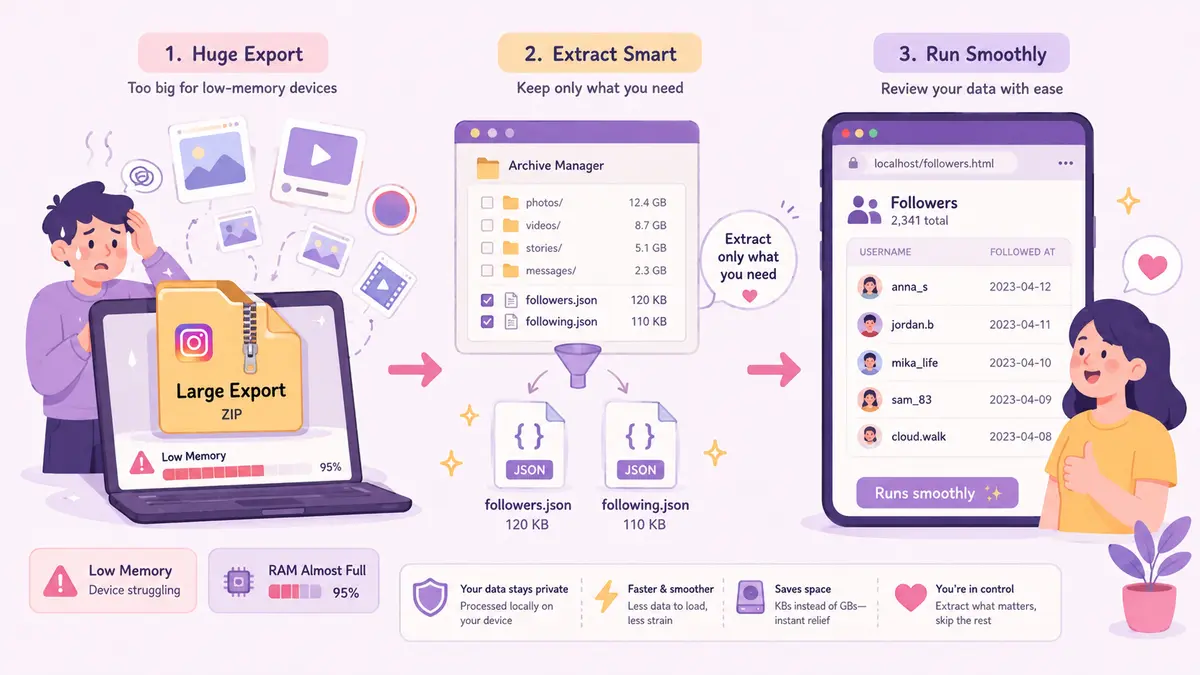
Downloading your account history from Instagram is the standard way to inspect follower changes, track engagement, and maintain personal backups without sharing account credentials with third-party servers. However, if your account has been active for several years, you may encounter an issue where the Instagram export file is too large for your hardware to handle comfortably. Older laptops, budget tablets, and smartphones with limited RAM often freeze, stutter, or crash completely when attempting to decompress a multi-gigabyte ZIP archive or open an extensive JSON file. Understanding how Instagram structures its data packages allows you to bypass hardware bottlenecks and access your connection logs without purchasing newer hardware or upgrading memory.
Why Instagram Export Files Become Unmanageable
When you request a complete download of your account information, Instagram bundles everything associated with your profile into a single or multi-part ZIP archive. This bundle contains not only plain text records—such as comments, likes, and profile changes—but also high-resolution media. Stories, feed videos, voice notes, archived posts, and direct message attachments make up roughly ninety-eight per cent of the total download size.
A long-standing account can easily generate a ZIP archive spanning anywhere between five and thirty gigabytes. When an older operating system tries to unpack an archive of that magnitude, it attempts to map temporary files into available memory and storage cache. If your computer has four gigabytes of RAM or an older mechanical hard drive, the system will exhaust available physical memory quickly. It then relies heavily on swap space or page files on the disk, slowing the entire operating system down to a crawl. The issue is rarely the follower data itself, which usually takes up less than a few megabytes; rather, it is the sheer volume of media files surrounding it.
Requesting a Leaner Data Archive from Instagram
If you have not yet requested your download—or if your previous attempt resulted in an unwieldy multi-part file—the most effective workaround is to filter the data at the source. Instagram’s Accounts Centre allows you to customise your export parameters before the system generates the archive.
Instead of selecting the default option to download all available information, choose to select specific types of information. Under this custom menu, tick only the categories you need to review. If your goal is to audit your audience, compare follower lists, or track unfollowers, you only need to select the connections and follower categories.
Additionally, select the JSON format rather than HTML if you plan to use an analytical tool, and ensure the date range covers your account from the start so you do not omit older connections. By deselecting posts, reels, messages, and stories, you reduce a twenty-gigabyte archive down to a lightweight file that typically measures under five megabytes. This smaller archive downloads in seconds and unzips instantly on virtually any device, regardless of age or available memory.
Extracting Specific Files Without Crashing Low-Memory Devices
If you already have a massive ZIP file on your machine and do not want to wait days for Instagram to generate a fresh export, you can extract only the necessary text files without decompressing the entire archive.
Default unzipping tools on Windows and macOS often attempt to decompress everything at once, which causes immediate memory pressure. Instead, use a lightweight archive manager like 7-Zip on Windows, Keka on macOS, or standard command-line tools. These utilities allow you to browse the contents of the compressed archive as a virtual folder structure before extracting anything.
- Open the multi-gigabyte ZIP file inside your chosen archive utility without clicking the option to extract all.
- Navigate down the directory path until you locate the followers and following folder.
- Inside this directory, look specifically for your follower and following list files in JSON or HTML format.
- Highlight only these specific files and extract them directly to your desktop.
- Close the archive manager and delete the original large archive if your local drive space is critically low.
This selective extraction method bypasses the resource-heavy decompression of media folders. Your device handles a few hundred kilobytes of data rather than thirty gigabytes of video clips, keeping CPU usage and memory footprints at near-zero levels.
Opening and Reading Large JSON Files Safely
Once extracted, working with raw JSON files presents another common pitfall on low-memory systems. Standard text editors such as basic Notepad, TextEdit, or simple mobile viewers are designed for flat text documents. When you feed them a structured JSON file containing tens of thousands of follower entries, they attempt to render the entire text block into memory simultaneously with syntax parsing, which frequently locks up the application.
To review your follower data without performance hiccups, use software designed to handle large datasets efficiently. Dedicated code editors or lightweight command-line viewers stream file contents without choking your system.
Alternatively, specialised web tools offer the simplest route. ByeBud processes the export locally in the browser, parsing your follower and following lists directly on your device without sending raw data over the internet or requiring heavy system resources. Because modern web browsers utilise optimised memory management for JSON structures, parsing isolated connection files takes only a fraction of a second, even on an older laptop or a basic smartphone.
Practical Tips for Maintaining Smooth Device Performance
Working on hardware with limited resources requires modest precautions to prevent unexpected system freezing during data parsing.
First, close extraneous browser tabs and background applications before opening files. Applications like music streaming services, office suites, and cloud sync tools consume considerable background RAM that an older system needs for file input and output operations.
Second, verify that your local drive has at least three times the space of the file you are processing. Operating systems require temporary disk overhead for memory paging. When storage drops below ten per cent remaining capacity, file read and write operations slow down exponentially.
By requesting only the necessary connection categories, selectively extracting target files, and utilising lightweight local parsing, an instagram export file too large message becomes entirely manageable on any computer. You retain complete privacy over your account credentials and personal information without needing high-end computing hardware.
Want to see who isn't following you back right now?
Use our safe Instagram unfollower checker — no login needed. Upload your official Instagram data export and get instant results.
Related articles
- What to Do With Your Instagram Unfollower List: An Action FrameworkDownloading your unfollower data is only the first step. Learn how to segment accounts, set retention rules, and safely pace manual removals without risking your account.
- Setting a Realistic Instagram Growth Goal Using Churn DataDiscover how to set a realistic Instagram growth goal using historical churn data. Learn the formula to balance follower attrition against gross acquisition.
- Remove Follower vs Block Instagram: Which Option Should You Choose?Should you remove a follower or block them entirely? Explore the technical differences, visibility rules, and social implications in this direct decision guide.
- How to Remove Instagram Followers in Bulk Using Native ToolsDiscover how to clean up your Instagram audience using native tools, built-in spam queues, and safe manual workflows without handing over your password.
- Why Instagram Follower Counts Differ from Data ExportsIf your profile follower count does not match the entries in your Instagram data export, several technical discrepancies explain the gap.