Is Your Content Causing You to Lose Followers? How to Identify What’s Killing Your Reach
Want to see who isn't following you back right now?
Use our safe Instagram unfollower checker — no login needed. Upload your official Instagram data export and get instant results.
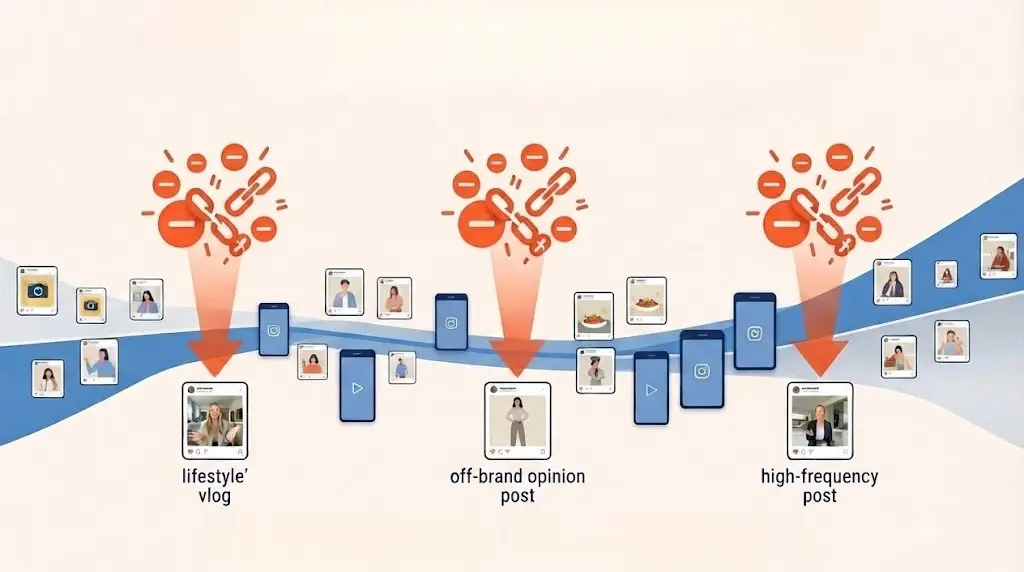
You put hours into your latest post. You checked the lighting, polished the copy, and hit publish with the confidence that this would be your best performer yet. Instead of the expected surge in engagement, you see something worse: your follower count drops.
Most creators treat an unfollow as a personal sting—a random act of disinterest. But if you are looking at your account through a professional lens, you should stop viewing these drops as random. They are data. They are early warning signals that a specific post format, an off-brand opinion, or an aggressive posting cadence has stopped resonating with your core audience.
Why Your Audience Is "Churning"
In 2026, the Instagram algorithm is hyper-sensitive to "content friction." When you post content that feels disconnected from the value your audience signed up for, you don't just get fewer likes—you get a churn spike.
If you are seeing a pattern of people leaving, you aren't just losing numbers; you are losing the feedback loop that dictates your future reach. When your audience rejects a post, the algorithm registers that signal and throttles your distribution for the next one. Understanding why they left is the only way to break that cycle.
Stop Guessing. Start Auditing.
You cannot fix what you cannot measure. The standard Instagram Insights dashboard tells you if your reach is down, but it rarely explains why. To truly optimize your strategy, you need to correlate your audience movement with your activity.
This is where precise auditing becomes your biggest advantage. By analyzing the timing of your unfollows against your recent content history, you can identify the exact "turning point" of your engagement:
-
Format Fatigue: Did a shift from high-value tutorials to "lifestyle" vlogs trigger the drop?
-
Cadence Collision: Did increasing your posting volume from two to five times a day overwhelm your followers?
-
The Content Mismatch: Was that "viral attempt" so off-brand that it signaled to your loyal followers that your account is no longer for them?
Use Your Data as a Growth Instrument
This is why professional creators use auditing tools—not to "spy" on who left, but to build a diagnostic map of their content strategy. By identifying the specific posts that caused churn, you can stop shouting into the void and start doubling down on the content that actually secures your community.
An unfollow is only a failure if you don't learn from it. Once you can pinpoint exactly which content caused the disconnect, you stop guessing and start engineering growth.
Are you ready to stop guessing what your audience wants? Start auditing your churn today and turn those "unfollows" into the blueprint for your next viral success.
Want to see who isn't following you back right now?
Use our safe Instagram unfollower checker — no login needed. Upload your official Instagram data export and get instant results.
Related articles
- Auditing Nonprofit Instagram Accounts: Beyond Vanity Follower CountsFor charities and community organisations, social media success is measured in real-world action, not follower tallies. Here is how to run an effective, privacy-first audit.
- What Happens When an Instagram Follower Deactivates or Deletes Their AccountWhen a follower disappears, they may not have unfollowed you. Discover how Instagram handles deactivated and deleted accounts, from missing DMs to cached counters.
- How to Remove Third-Party Apps Connected to Your InstagramA complete, step-by-step cleanup guide on how to audit, revoke, and remove third-party apps connected to your Instagram account on mobile and desktop.
- What Happens to Instagram Reach in the First 14 Days After a Follower PurgeDoes removing followers affect reach immediately? Here is a breakdown of what happens to your Instagram impressions, engagement percentages, and algorithmic distribution during the first 14 days after an audience clean-up.
- Why Your Instagram Export Count Is Missing Deactivated AccountsWhen your official Instagram export lists fewer followers than the number displayed on your profile, deactivated accounts and pending requests are usually responsible. Here is how Meta treats dormant records in data downloads.