How to Reset Your Instagram Algorithm in 2026 (The Best Way)
Want to see who isn't following you back right now?
Use our safe Instagram unfollower checker — no login needed. Upload your official Instagram data export and get instant results.
Is Your Explore Page "Broken"?
We have all been there. You open Instagram, expecting to see content you love, but your Explore page is full of random videos, irrelevant memes, or topics you haven't cared about in years.
It feels like the algorithm has "forgotten" who you are.
In the past, the only fix was to manually unlike thousands of posts or—in extreme cases—delete your account and start over. But in 2026, you don't need to go that far. Instagram has introduced official ways to perform a "Hard Reset" on your recommendations.
Here is how to wipe the slate clean and retrain the AI to show you what you actually want.
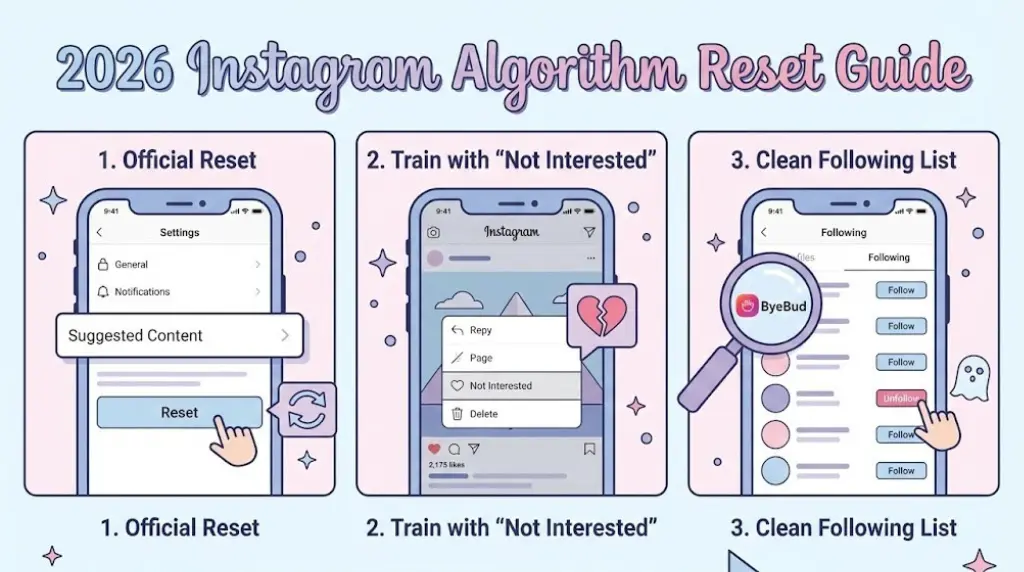
Step 1: The "Suggested Content" Reset (Hidden Feature)
In late 2025, Instagram rolled out a powerful feature that many users still don't know exists. It allows you to wipe your "interest history" for recommended posts.
How to do it:
- Go to your Profile and tap the Menu (≡) in the top right.
- Tap Content Preferences (or "Suggested Content" depending on your region).
- Select Reset Suggested Content.
- Confirm your choice.
What happens next:
Instagram will warn you that your Explore page might look "generic" for a few days. This is good! It means the AI has forgotten your old habits and is waiting for you to tell it what you like now.
Step 2: The "Not Interested" Training Method
Once you have reset the system, you need to train it immediately so it doesn't drift back to bad habits.
- For the first 48 hours after your reset, be aggressive with the "Not Interested" button.
- On Explore: Long-press any post you dislike and tap "Not Interested."
- On Reels: Tap the three dots (...) and select "Not Interested."
This sends a "negative signal" that is much stronger than just scrolling past. It tells the algorithm: "Never show me this topic again."
Step 3: The "Follower Purge" (Crucial Step)
This is the step most people miss. Resetting your "Interests" won't work if you are still following the wrong accounts.
Your "Following" list is the #1 signal Instagram uses to decide what to show you. If you are still following 500 accounts from 5 years ago—people who don't follow you back, dead accounts, or random brands—the algorithm will keep trying to show you content like theirs.
To truly fix your feed, you need to clean up your connections.
The Problem with Cleaning Manually:
Scrolling through 2,000 accounts to find who to unfollow is impossible. You don't know who is active, who follows you back, or who is just clutter.
The Solution:
Use ByeBud to visualize your following list instantly. By uploading your official data, you can see exactly who doesn't follow you back. These non-mutual connections are often the source of "bad data" feeding your algorithm.
Conclusion:
A "Hard Reset" is a great way to fall in love with Instagram again. By using the official Reset Suggested Content tool and cleaning up your Following list with ByeBud, you can build a feed that actually inspires you.
Want to see who isn't following you back right now?
Use our safe Instagram unfollower checker — no login needed. Upload your official Instagram data export and get instant results.
Related articles
- Auditing Nonprofit Instagram Accounts: Beyond Vanity Follower CountsFor charities and community organisations, social media success is measured in real-world action, not follower tallies. Here is how to run an effective, privacy-first audit.
- What Happens When an Instagram Follower Deactivates or Deletes Their AccountWhen a follower disappears, they may not have unfollowed you. Discover how Instagram handles deactivated and deleted accounts, from missing DMs to cached counters.
- How to Remove Third-Party Apps Connected to Your InstagramA complete, step-by-step cleanup guide on how to audit, revoke, and remove third-party apps connected to your Instagram account on mobile and desktop.
- What Happens to Instagram Reach in the First 14 Days After a Follower PurgeDoes removing followers affect reach immediately? Here is a breakdown of what happens to your Instagram impressions, engagement percentages, and algorithmic distribution during the first 14 days after an audience clean-up.
- Why Your Instagram Export Count Is Missing Deactivated AccountsWhen your official Instagram export lists fewer followers than the number displayed on your profile, deactivated accounts and pending requests are usually responsible. Here is how Meta treats dormant records in data downloads.