Browser-Based vs Installed Unfollower Tools: Where Data Goes
Want to see who isn't following you back right now?
Use our safe Instagram unfollower checker — no login needed. Upload your official Instagram data export and get instant results.
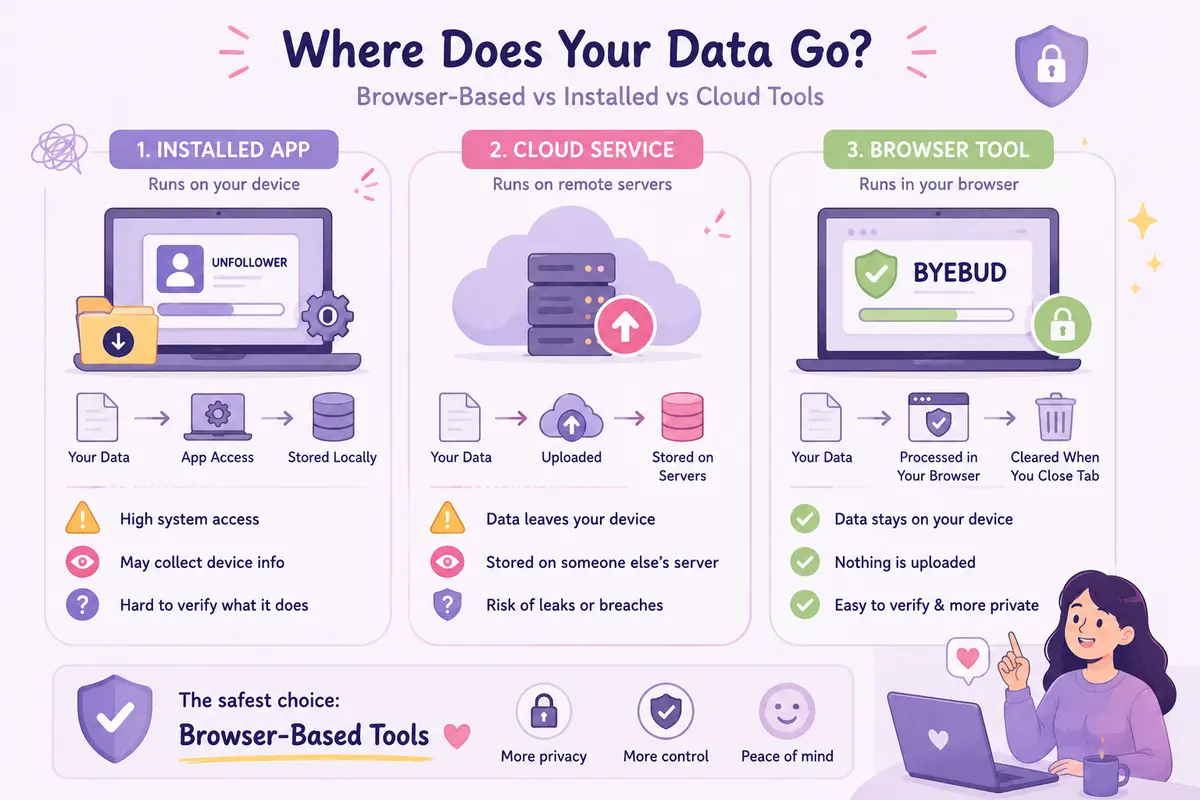
When evaluating software to inspect changes in your Instagram audience, the graphical interface rarely reveals where the computation happens or where your personal information travels. Tools designed to identify unfollowers generally fall into three technical architectures: native binary applications installed directly on your operating system, cloud-hosted web services that execute logic remotely, and client-side web utilities executing entirely inside a browser runtime. Each architectural design establishes a distinctly different boundary for data access, memory persistence, and network transmission. Understanding how these structural patterns handle your raw account data is essential for preserving privacy, safeguarding personal records, and avoiding unintended profile exposure.
Native Application Architecture: System Access and Background Privileges
Native applications—whether distributed as mobile packages on iOS and Android or compiled desktop executables on macOS and Windows—operate with direct access to operating system APIs. Once installed, a native binary can query hardware identifiers, inspect local storage directories, read device telemetry, and maintain persistent background services even when the primary window is closed.
When an installed unfollower utility runs, it requires access to local system storage to read account information or follower records. Because native code executes outside the strict security boundaries of a web browser sandbox, it can issue socket requests across custom network ports, communicate with unlisted telemetry endpoints, and cache profile state across persistent local databases or hidden configuration registries. Even if an installed application claims to operate completely offline, confirming its network isolation requires complex system-level monitoring using dedicated packet inspection utilities.
Furthermore, installed desktop and mobile tools frequently bundle third-party software development kits (SDKs) for crash reporting, advertising tracking, and behavioural analytics. These bundled libraries inherit the application's native privileges automatically. When the application performs an audience comparison, those background SDKs may transmit device metadata, IP addresses, hardware fingerprints, and operational timestamps to third-party analytics aggregators without presenting explicit network prompts or transfer dialogues to the user.
Cloud-Hosted Web Services: Remote Data Processing Pipelines
Cloud-hosted web services adopt a remote execution model. In this setup, a user interacts with a standard web interface, but the computation takes place on a remote server or containerised backend managed by the service operator.
When you provide an account export or profile dataset to a cloud-based service, your files traverse the public internet via HTTP POST or PUT requests to reach external infrastructure. Once received, the backend server parses the raw dataset, loads follower lists into server memory, compares user arrays, and stores records inside remote relational or document databases for ongoing retrieval.
This pattern introduces substantial architectural risks regarding data retention, data sovereignty, and breach vulnerability. Even if an external service promises immediate record deletion, uploaded data resides temporarily in server memory buffers, persists across application runtime logs, and may be captured in automated cloud backup snapshots. Because end users cannot inspect the remote server’s internal runtime environment or database access controls, they must rely on policy assertions rather than verifiable technical isolation. Any misconfigured cloud storage bucket, unpatched server dependency, or backend database breach directly exposes the uploaded audience records to unauthorised third parties.
Client-Side Browser Execution: Sandboxed Memory Models
Client-side web applications use a fundamentally different operational model by using the web browser as an isolated virtual runtime. In this paradigm, the web server delivers static HTML, CSS, and compiled JavaScript assets to your local machine. Once the browser receives these static files, all data parsing, array diffing, and analytical calculations occur exclusively within your computer's local memory space using browser engines such as V8 or SpiderMonkey.
Evaluating browser based instagram tool privacy requires examining the execution sandbox enforced by modern web standards. Modern browsers isolate each active tab into an independent process with rigid execution boundaries. JavaScript executing inside a tab cannot access your local file system arbitrarily; it can only read specific files that you explicitly supply through standard HTML file input elements or drag-and-drop browser events.
For example, ByeBud is engineered around this client-side paradigm, processing your exported archive entirely within the local browser runtime without transmitting file contents over the network. Once the analytical comparison finishes, the computed results display directly in the browser document. The raw dataset remains strictly confined to the temporary execution context of the active tab. When you close or refresh the tab, the browser's internal garbage collector purges the allocated memory buffers, leaving no lingering footprint on external servers, third-party databases, or local file directories.
Auditing Data Flows: Network Inspection and Memory Lifecycles
The primary technical advantage of client-side web architectures over native binaries and remote cloud backends is direct verifiability. Any user can independently confirm where data flows by using standard browser developer tools without installing specialised packet capture utilities.
To audit how a browser-based utility handles your files:
- Open your browser's Developer Tools (F12 or Option + Command + I on macOS) and navigate to the Network tab.
- Tick the "Disable cache" setting and ensure the filter is set to record all network requests.
- Load your Instagram data export file into the application interface.
- Monitor the network log while the application parses and processes the records.
In a genuine client-side architecture, zero outbound POST, PUT, or WebSocket requests containing your follower payloads will appear in the network activity log. All computational activity is visible exclusively through local CPU and memory allocation graphs in the Performance tab. In contrast, native mobile or desktop binaries obscure their data transmission pipelines behind compiled machine code, requiring network proxy configurations or external firewall software to verify whether account information is leaving your machine.
Architectural Criteria for Privacy-First Tool Selection
Selecting software to analyse audience metrics requires looking beyond cosmetic interfaces to evaluate the underlying software architecture. When assessing any unfollower tracking utility, consider three decisive technical criteria:
- Execution environment: Utilities that execute entirely within the client-side browser runtime eliminate exposure to external cloud infrastructure and third-party data breaches.
- System privilege boundaries: Sandboxed browser runtimes prevent unauthorised background file reading, whereas native binaries possess wide operating system access.
- Verifiability: Static web applications allow instantaneous verification via native browser developer consoles, proving that no records leave your local device.
By prioritising client-side web architectures that execute locally, you maintain complete ownership of your follower datasets while avoiding the security and privacy compromises inherent to installed binaries and cloud-hosted backends.
Want to see who isn't following you back right now?
Use our safe Instagram unfollower checker — no login needed. Upload your official Instagram data export and get instant results.
Related articles
- Does Instagram Notify Someone When You Unfollow Them?Does Instagram tell someone when you unfollow them? Here is the direct answer, how the platform handles follower removals, and how people spot unfollows.
- How to Handle a Large Instagram Data Export on Low-Memory DevicesIs your Instagram export file too large for an older computer or phone? Learn how to selectively download connection logs and extract JSON data without system crashes.
- What to Do With Your Instagram Unfollower List: An Action FrameworkDownloading your unfollower data is only the first step. Learn how to segment accounts, set retention rules, and safely pace manual removals without risking your account.
- Setting a Realistic Instagram Growth Goal Using Churn DataDiscover how to set a realistic Instagram growth goal using historical churn data. Learn the formula to balance follower attrition against gross acquisition.
- Remove Follower vs Block Instagram: Which Option Should You Choose?Should you remove a follower or block them entirely? Explore the technical differences, visibility rules, and social implications in this direct decision guide.